Note 1: For this, I am using not only Matlab but the Signal Processing Toolbox. Got to study the other tools that Matlab has to deal with filters...
Note 2: I should write something like this but with some free tool out there... Anyhow, for the moment just use Matlab, as I have it available in my company...
Quick reading, it looks like there are couple of methods:
- A=ellip(specs) --> H=dfilt.df1(A) where A are the numerator and denominator coeff. This is kind of going analog to then move to digital.
- D=fdesign.bandpass(specs) --> H=design(D, ellip)
H is the object describing the digital filter (not exactly the coefficients, see more below). We will look in detail and extend the method 2 following
Getting started with discrete time filters (dfilt) or
fdesign objects.
1/ First got to get the object describing the specification of the filter we want. So, we use fdesign. Just type "fdesign.bandpass" for a very simple syntax, or go to
fdesign for more info.
In our case, we want to create a bandpass filter around 2.5KHz. So, we will do:
>> D=fdesign.bandpass(2000,2200,2800,3000,40,1,40,44100)
And we get:
D =
Response: 'Bandpass'
Specification: 'Fst1,Fp1,Fp2,Fst2,Ast1,Ap,Ast2'
Description: {7x1 cell}
NormalizedFrequency: false
Fs: 44100
Fstop1: 2000
Fpass1: 2200
Fpass2: 2800
Fstop2: 3000
Astop1: 40
Apass: 1
Astop2: 40
2/ To get the real design, we use:
>> h=design(D,'ellip')
And get:
h =
FilterStructure: 'Direct-Form II, Second-Order Sections'
Arithmetic: 'double'
sosMatrix: [4x6 double]
ScaleValues: [5x1 double]
OptimizeScaleValues: true
PersistentMemory: false
For help, type designmethods(h) to get a list of filters.
3/ At this moment, we may actually like a different structure. Notice it used the default one (direct form II)
but we may want the more standard one. I am going to use direct form I as it is easier for me to identify what output number below matches what coefficient (notice that I am learning while doing this), so, it'll be easier to program:
Note: notice the error on the - sign in the added of b(nb) path.
So, we do:
>> h1 = convert(h,'df1')
h1 =
FilterStructure: 'Direct-Form I'
Arithmetic: 'double'
Numerator: [1x9 double]
Denominator: [1x9 double]
PersistentMemory: false
To see what we get, we can do:
>> info(h1)
Discrete-Time IIR Filter (real)
-------------------------------
Filter Structure : Direct-Form I
Numerator Length : 9
Denominator Length : 9
Stable : Yes
Linear Phase : No
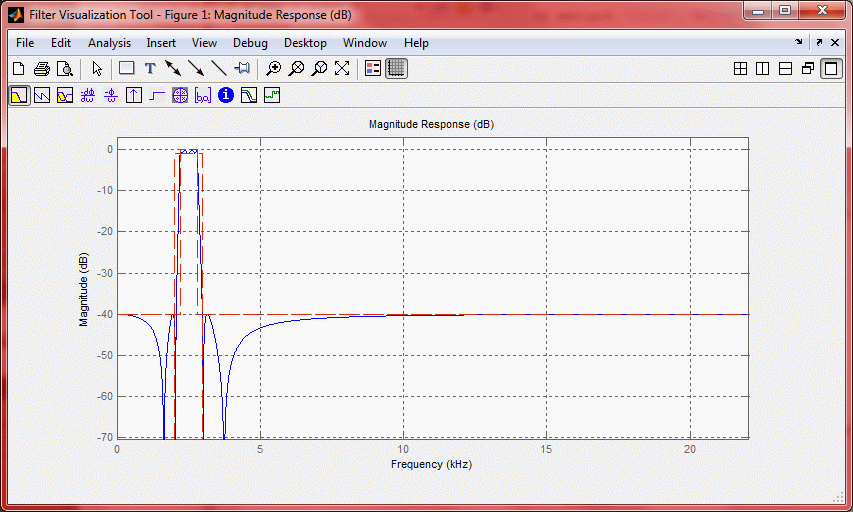
4/ At this point, if we want to see what we got, it is as simple as using the Filter Visualization Tool:
hfvt=fvtool(h1);
5/ To get the coefficients, use:
num = get(h1,'Numerator');
den = get(h1,'Denominator');
In our case:
num = 0.0099 -0.0729 0.2418 -0.4681 0.5789 -0.4681 0.2418 -0.0729 0.0099
den = 1.0000 -7.4222 24.5776 -47.3746 58.1077 -46.4331 23.6104 -6.9884 0.9229
Where numerator and denominator are (when a0=1, like in our case):
In this kind of structure
Notice that a0 in Matlab is den(1) as the index starts at 1. So, we create in Matlab a piece of code that will do this (equivalent to running y=filter(h1,rx)):
rx2=[zeros(length(num)-1,1);rx];
y=zeros(length(rx)+length(num)-1,1);
for R=length(num):length(rx2)
data=0;
for N=1:length(num)
data=data+rx2(R-N+1)*num(N);
end
for D=1:(length(den)-1)
data=data-y(R-D)*den(D+1);
end
y(R)=data/den(1);
end
Translating this into C is straightforward. Notice that the initialization is important. I.e., getting both, input and output past values equal to zero. We can do that adding those in front of our sequences/arrays, or, just make zero the first set of values on those arrays. Of course, this is just for test and assuming you don't care about that data being lost... Either way, you get the point :)
The plot on the left is the result using "filter" while the one on the right is the one from the "C" code.
Other useful information:
For an automatic way to do it:
Forum describing how to do it
From Simulink to C
From Matlab to HDL
Real Time Workshop Embedded Coder
Matlab filter design
Designing Low Pass FIR filters
FDATool
To use your filter (DUH!): y=filter(num,den,x);
To see the impulse response of your filter
use [h,t] = impz(num,den) and plot(t,h)
To check if it is stable: isstable(h) - Note: I didn't get it to work where I can check it with filter running in a given precision
Nice write up on filter theory:
http://www.mikroe.com/chapters/view/73/chapter-3-iir-filters/
And another one...
And one more!